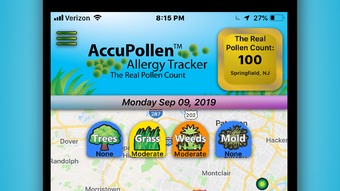

Track Pollen Levels in Real Time
Overview
The AccuPollen Allergy Tracker is a free desktop application developed by Dr. Leonard Bielory, a recognized allergist, to support individuals suffering from pollen- and mold-induced allergies. Designed for users experiencing symptoms related to the eyes, nose, skin, and asthma, the software offers a focused solution for managing seasonal allergic reactions. Its primary function is to deliver real-time pollen counts based on data collected from a network of "Pollen Stations" across the country. These stations upload their findings to a centralized database, which the app accesses to provide localized, up-to-date information. The application uses geolocation to link users with the nearest station, ensuring accurate data delivery. Users also have the option to manually select any station on the interactive map to view its latest counts. While still in early development (version 1.0), the app is positioned as a practical tool for daily allergy monitoring. The developer has not provided additional details about the intended user base beyond allergy sufferers. Real-world usage scenarios include planning outdoor activities, adjusting medication schedules, and tracking environmental triggers. The app is intended for personal use only, with all data rights held by STARx Technical Corp., LLC.
Key Features & Capabilities
- Real-time Pollen and Mold Counts – Access up-to-date pollen and mold data from a nationwide network of monitoring stations, ensuring users receive timely information to anticipate allergic reactions.
- Location-Based Data Integration – Automatically detects the user’s location to connect with the nearest pollen station, delivering geographically relevant data.
- Interactive Map Interface – View and select any pollen station on a map to access its most recent counts, enabling comparison across regions.
- Free Access for All Users – The software is available at no cost, making allergy tracking accessible to a broad audience without subscription fees.
- Personalized Allergy Management – Supports users in adjusting daily routines and medication based on current environmental conditions.
These features are particularly useful for individuals who experience recurring seasonal allergies. For example, a user planning a weekend hike can check the app to verify low pollen levels before leaving. Similarly, someone managing asthma may use the mold count data to decide whether to open windows or use air filtration. The app’s focus on accuracy through verified station data enhances its reliability for health-related decisions. While additional features are under development, the current capabilities provide a solid foundation for real-time environmental monitoring. The developer has not specified whether data is updated hourly or in real time, nor has it detailed the number of stations in the network.
User Interface, Workflow & Performance
The user interface of the AccuPollen Allergy Tracker appears designed for clarity and ease of navigation, prioritizing essential data such as current pollen levels and station locations. The layout likely centers around a map-based display with visual indicators for station status and pollen concentration. Navigation between the map view and data summaries is expected to be intuitive, supporting quick access to critical information. The workflow is streamlined for users seeking immediate insights—inputting location or selecting a station should require minimal steps. Based on the app’s purpose and early development stage, the interface may still be undergoing refinement. Performance details were not specified by the developer, and exact resource usage (CPU, RAM) remains unknown. General software behavior suggests it operates efficiently on modern systems, but no benchmarks or load tests were provided. Stability and responsiveness during extended use have not been publicly documented. The app is designed for continuous background operation to deliver timely updates, though the developer did not clarify whether notifications or alerts are supported. No performance issues were reported in the initial release, but user feedback will likely shape future improvements.
Compatibility & System Requirements
The AccuPollen Allergy Tracker is available for both Windows and Mac operating systems, making it accessible to a wide range of desktop users. The software has a file size of 50 MB, indicating a lightweight installation that should not strain system resources. The application is currently in version 1.0, indicating it is in early development with potential for future enhancements. The developer did not provide additional system requirements, such as minimum RAM, processor speed, or disk space. Compatibility information is limited to the operating systems listed. No specific hardware requirements were mentioned, nor was there any indication of whether the app supports older or low-end systems. The app may require an internet connection to fetch real-time data from pollen stations, but this was not explicitly confirmed. Installation is expected to be straightforward, though the developer did not include step-by-step instructions or setup guides.
Pros and Cons
Pros
- Free to use with no subscription or hidden costs
- Real-time pollen and mold data from verified monitoring stations
- Interactive map for selecting and comparing regional data
- Designed by a medical professional (Dr. Leonard Bielory) for allergy sufferers
- Lightweight installation at just 50 MB
Cons
- Version 1.0 indicates early development with potential for bugs
- No detailed system requirements provided
- Exact update frequency and data refresh rate not specified
- Only available for Windows and Mac, no mobile or Linux support
- Development team has not disclosed notification or alert features
FAQ Section
Is AccuPollen Allergy Tracker free to download?
Yes, the software is available at no cost. There are no subscription fees or in-app purchases required to access its core features.
What operating systems does it support?
AccuPollen Allergy Tracker is compatible with Windows and Mac systems. No information was provided about support for Linux or mobile platforms.
How often is the pollen data updated?
The developer did not specify the exact update frequency. Data is sourced from real-time pollen stations, but the refresh rate remains unclear.
Can I use the app offline?
Due to its reliance on live data from external stations, the app likely requires an active internet connection. Offline functionality was not confirmed.
Is the app safe to use?
The software is developed by Dr. Leonard Bielory and distributed as a free desktop tool. It does not appear to include known security risks. However, users should only use the data for personal health awareness and not as a medical diagnosis.
Final Thoughts + CTA
AccuPollen Allergy Tracker presents a promising, accessible tool for individuals managing pollen and mold allergies. With its real-time data integration, map-based interface, and professional development background, it stands out as a focused solution in the health and fitness software space. While still in version 1.0, the app delivers essential functionality for daily allergy monitoring without cost. Its lightweight design and cross-platform availability enhance its usability. Users seeking a straightforward way to track environmental triggers will find value in its current capabilities. The absence of detailed system requirements and update frequency limits full transparency, but the core features remain effective. For allergy sufferers looking for a reliable, free desktop tool to stay ahead of seasonal symptoms, this app offers a practical starting point. Download AccuPollen Allergy Tracker now.







